|
|
What is a ColecoVision ?. |
|
|
What is a ColecoVision ?. |
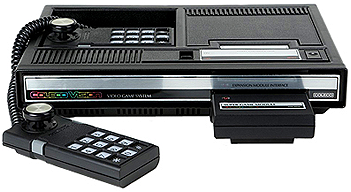
A ColecoVision is an 8 bit cartridge based Video Game Console for home use
produced by coleco industries in the beginning of the 80's.
In order to connect ColecoVision to a LCD / Television could you only choose between the RF
signal or an RGB later version.
There were produced updated ColecoVision versions for the NTSC market and 3 or 4 versions for the PAL / SECAM
market.
NTSC versions = 110-130 Volt and 60 Hz.
Coleco Inc. stopped all its electronic division and thus ColecoVision and the computer ADAM was stopped instantly.
Something peculiar to a ColecoVision is how the games works.
How to hook up your NTSC ColecoVision system.
1. Connect your ColecoVision to your Tv. (The RF lead back on your ColecoVision to antenna in back on
your television).
How to hook up your CBS ColecoVision system.
1. Connect your CBS ColecoVision to your Tv. (The RF lead back on your CBS ColecoVision to antenna in back on
your television).
How to hook up your French CBS ColecoVision system.
1. Connect your French CBS ColecoVision to your Tv. (The DB 15 lead back on your ColecoVision to the Scart
Euro-connector back on
your television).
ColecoVision is developed in the U.S., most of them are produced in the U.S.,
while many are manufactured in Hong Kong / China.
ColecoVision had its best time in the 80's, and the games that it referred to
were games that were advanced in the arcades in the 80's.
If you do not know the games from this era are you simply too young to know.
I would describe it a little for you here.
Many of the known games include Donkey Kong, Zaxxon, Lady Bug, Popeye, Burger
Time, Galaxian, Gyruss, Gorf, and many many more.
There now is over 200 games for ColecoVision and there still developing games for it,
even today by people who love their passion for this gaming console.
The ColecoVision console was in production from 1982 until 1983, maybe
1984.
The last official games was produced and released in 1985, but the screen
displayed 1984.
Many were dissatisfied with the RF signal and someone found out that you could
disassemble the machine apart
and draw a direct video out which gave a noticeably better picture.
You can also chose to let other upgrade your ColecoVision with better picture,
better Joysticks, pause feature etc.
PAL / SECAM versions = 220-240 Volt and 50 Hz.
PAL / SECAM version = 220-240 Volt and 50
Hz. with RGB or RGB updates opportunities by default.
Difference between 50 and 60 hz. make that most, if not all 50Hz. games runs a bit slower on a PAL machine than
the NTSC version.
The gameplay and the sounds and melodies are slower.
Game ROMs was only distributed in the U.S. version, with different shells around and
a label variation, but also the boxes and manuals were different.
Boxes from U.S. and Canada was mostly with the arcade machine showed on the
front, while boxes from Europe and Australia was with a nice artwork.
It was costly, and it was decided in early 1984 that all cartridges should be
identical, so no special cartridge for PAL versions from 1984.
The same year stopped all Coleco's production of games for ColecoVision, and a
large stock was scattered to the winds.
Many people around the world would not accept that there was no new games anymore, so they are still developing games for ColecoVision to this day.
You'll probably also still find games for the Brazilian and Taiwan market.
These games are with
different shells, boxes and other labels, even the name of the game have changed,
but also those works fine.
It doesn't matter whether the machine is NTSC or PAL. -Almost all games work on both
machines.
They are so to speak region free, and you don't have to fix anything for that. -No extra equipment needed.
You can buy games as well in Europe as USA, they all works.
You can use your console and the games from Europe, but be aware for the power unit,
always use a power supply which fits to your own country.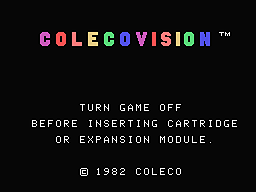
2. Connect your ColecoVision Power supply to wall and back on your ColecoVision.
3. Insert your joysticks or controllers in their respective connectors. (Player
1 upper and Player 2 lower).
4. Tune or set your Tv. and push reset on ColecoVision every 10 seconds when the Tv is seeking
the channel.
Just to make sure the ColecoVision main screen not automatically will go black,
some tv's goes further to next channel if it not can "feel" the signal.
5. When found: "ColecoVision, Turn game off before ..." should
now stands clearly.
6. Remember to store the channel (If not automactic do so) when found, and turn
the game console off again.
7. Insert now a ColecoVision game cartridge in ColecoVision, turn your ColecoVision on, press reset and
you are ready to play.
8. Reset is a good feature if the startup screen cluttering the picture or a
sound hangs.
9. Press 1 on controller number one and your game should now start up.
10. You can now enjoy all your games.
2. Connect your ColecoVision Power supply to wall and back on your CBS ColecoVision.
3. Insert your joysticks or controllers in their respective connectors. (Player
1 upper and Player 2 lower).
4. Tune or set your Tv. and push reset on your CBS ColecoVision every 10 seconds when the Tv is seeking
the channel.
Just to make sure the CBS ColecoVision main screen not automatically will go black,
some tv's goes further to next channel if it not can "feel" the signal.
5. When found: "ColecoVision, Turn game off before ..." should
now stands clearly.
6. Remember to store the channel (If not automactic do so) when found, and turn
the game console off again.
7. Insert now a ColecoVision game cartridge in your CBS ColecoVision, turn your
CBS ColecoVision on, press reset and
you are ready to play.
8. Reset is a good feature if the startup screen cluttering the picture or a
sound hangs.
9. Press 1 on controller number one and your game should now start up.
10. You can now enjoy all your games.
2. Connect your ColecoVision Power supply to wall and back on your French CBS ColecoVision.
3. Insert your joysticks or controllers in their respective connectors. (Player
1 upper and Player 2 lower).
4. Turn game on and the ColecoVision main screen should
now stands clearly in different colors.
5. Turn
the game console off again.
6. Insert now a ColecoVision game cartridge in your French
CBS ColecoVision, turn your French CBS ColecoVision on, press reset and
you are ready to play.
7. Reset is a good feature if the startup screen cluttering the picture and/or a
sound hangs.
8. Press 1 on controller number one or hit a button for other games, and your game should now start up.
9. You can now enjoy all your games.
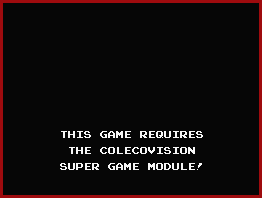
NOTE: If you have a ColecoVision game that requires
the SGM,
The Super Game module.
You will need to buy such a module to get the game to work.
If you trying to play a SGM game without the Super Game Module, will this screen below will appear on your tv.
If you don't have the SGM, no fear.
You do not damage your
ColecoVision, but the game will not run
unless you obtain the module.
The module is an RAM and Sound expander for the ColecoVision SGM games.
There is 3 Super Games Modules on the market.
Two from Opcode Games called: ColecoVision Super Game Module, Opcode Super Game
Module and one from Fred Kono called Juice Say Game.
Juice Say Game has included a Speech chip: SPO256A-AL2, Sound
chip: AY-3-8912, and 256K RAM.
ColecoVision Super Game Module has included Sound chip:
AY-3-8910, and 24K RAM., and ColecoVision Super Game
Module is approved by RWB.
Exists in a French version, also from Opcode Games, almost indentical with the
ColecoVision Super Game Module, but
the French SGM version is modified to also work with the French CBS RGB ColecoVision
version.
Last updated:
June 13, 2022.
June 13, 2021.
August 23, 2020.
January 13. 2016.
